1
首页选择「有预订」
Select “有预订” (I have a reservation).
①有预订
②核验证件
③查找订单
打开手机里的预订确认信息,后面可能需要核对订单上的预订人姓名。
Keep your booking confirmation open. You may need the booker’s name shown on it.
准备好本人证件、手机和预订确认信息,按下方图文步骤登记并领取房卡。
Go to the kiosk in Room 4083 on the 4th floor. Have your ID, phone and reservation confirmation ready.
Phone field: 8 or 11 digits only
提示“找不到订单”?输入订单上的预订人姓名继续 →Booking not found? Enter the booker’s name.
Already booked? Follow these steps.
Select “有预订” (I have a reservation).
打开手机里的预订确认信息,后面可能需要核对订单上的预订人姓名。
Keep your booking confirmation open. You may need the booker’s name shown on it.
Verify your identity with your own document.
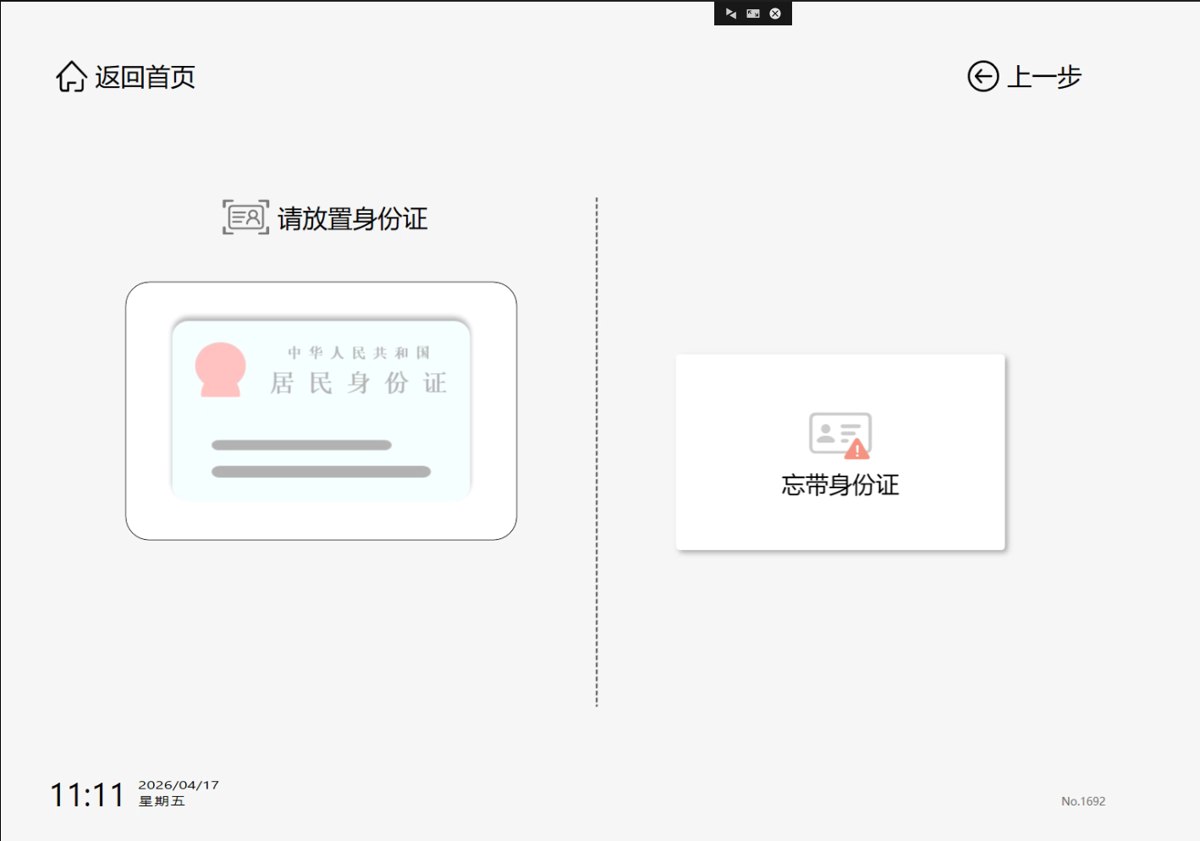
支持以下证件:
使用大陆身份证时,将证件放在指定读卡区域。使用护照、回乡证或台胞证时,按现场屏幕提示完成核验。
Supported documents: mainland Chinese resident ID, passport, Mainland Travel Permit for Hong Kong and Macao Residents, and Mainland Travel Permit for Taiwan Residents. Follow the kiosk prompts for your document.
忘带大陆身份证时,可选择「忘带身份证」,用微信或支付宝扫描机器当前显示的二维码办理核验。
If you forgot your mainland Chinese ID, select “忘带身份证” and scan the code currently displayed on the kiosk with WeChat or Alipay.
Successful ID verification does not mean your booking has been found. If you use a passport or travel permit, or your ID name differs from the booker’s name, follow Step 4.
Enter your phone number: 8 or 11 digits only.
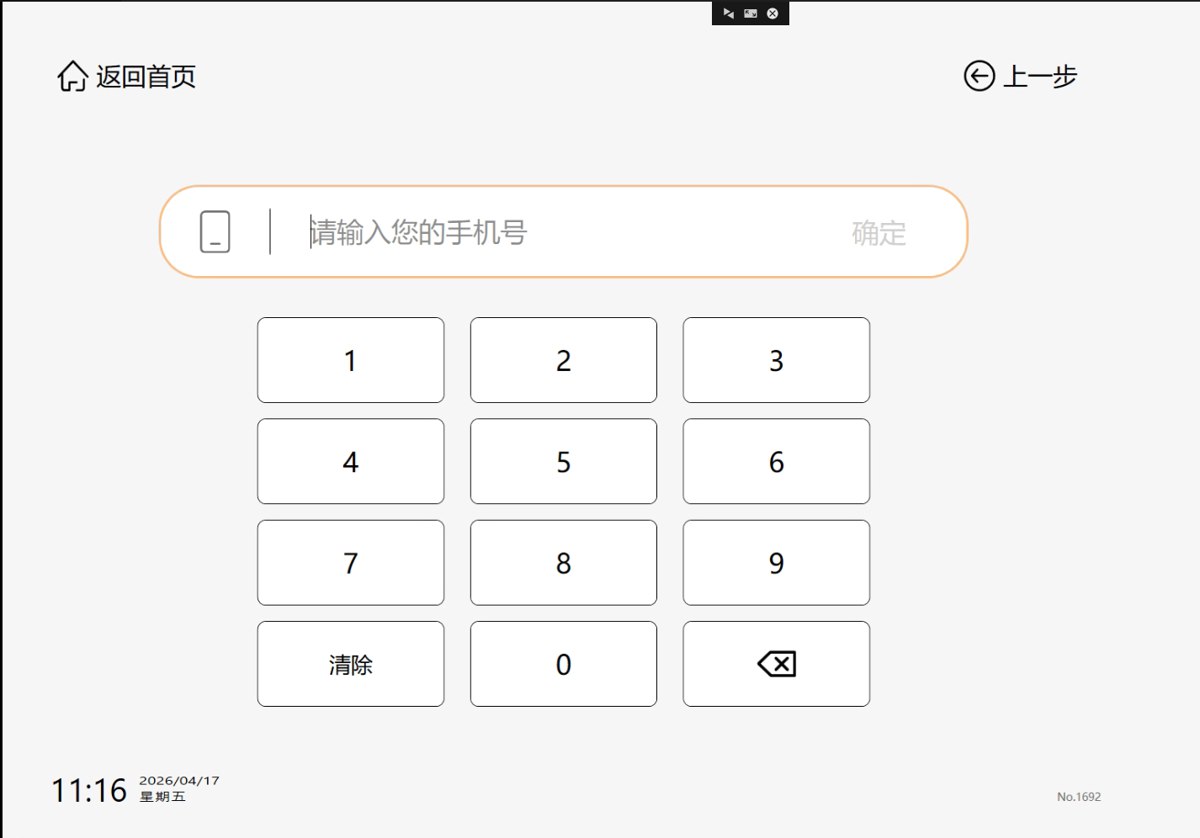
该输入框只支持8位或11位数字,输入后点击「确定」。
This field accepts only an 8-digit or 11-digit phone number. Tap “确定” (Confirm) after entering it.
If your number has a different length, do not shorten it or add random digits. Contact reception. If no booking is found, follow the next step.
Booking not found? Enter the booker’s name.
以下情况可能无法直接匹配订单:
This can happen with passports or travel permits, or when the name on your mainland Chinese ID differs from the booker’s name—for example, when someone else booked for you.
以预订确认信息为准;他人代订时,不要直接填成当前办理人的姓名。
Enter the booker’s name exactly as shown on your reservation confirmation, then continue. If someone booked for you, use that person’s booking name.
Use the actual name on your booking; “王小明” is an example only.
输入后仍找不到?请把预订确认信息准备好,联系前台协助查询。
Still not found? Have your booking confirmation ready and contact reception.
Check the booking and complete any requested payment.
核对房型、入住及离店时间、入住人数。若机器提示付款,核对金额后按提示操作,并等待支付成功。
Check the room type, stay dates and guest count. If payment is requested, check the amount, follow the prompts and wait for confirmation.
如果您已付款,但机器仍提示需要支付,请先联系前台核对。
If you have already paid but the kiosk requests payment again, contact reception first.
Register accompanying guests and collect your key card.
在订单页点击「入住」。有同行人时选择「添加同住人」,逐一登记后选择「已全部登记」。核对房间号,再点击「领卡并入住」,按机器提示领取房卡。
Tap “入住”, register each accompanying guest with “添加同住人”, then select “已全部登记”. Check your room number, tap “领卡并入住” and collect your key card as prompted.
No reservation? Choose “无预订” on the kiosk.
Verify your ID, enter an 8- or 11-digit phone number, choose your room and dates, then pay as prompted. Register all guests and collect your key card. Contact reception if your phone number has a different length.
手机号无法输入、输入预订人姓名后仍找不到订单、付款状态不明或未出房卡,请联系我们。
Contact us if your phone number is not accepted, the booking is still not found after entering the booker’s name, payment status is unclear, or no card is issued.
拨打前台 177 2748 5741微信 / 电话:17727485741